
What “Contextual Data” Actually Means at the Retailer Schema Level
22nd Oct, 2026

By Sadananda Vaidya
Part 2 of 4 in a series on the data layer behind defensible retail pricing. View Part 1 here
A pricing analyst at a mid-sized appliance brand once asked us a question that sounds simple: “Why does our 8kg front-load washing machine show up as three different products in our own dashboard?” The answer, once we pulled the raw feeds, was that three retailers had described the same SKU as “8 KG FL Washing Machine, Inverter, White,” “Front Load Washer 8.0kg, Silver Grey (Inverter Motor),” and “8kg Front Load WM White Inv.” Same product. Same capacity. Same technology. Three schemas, three vocabularies, and (until someone normalizes it) three products in a pricing model that should be looking at one.
In Part 1 of this series we argued that a pricing recommendation is only as defensible as the input layer underneath it, and that the layer is made up of six things retail data has to get right. This post starts at the bottom of that stack, because everything else in the series depends on it. Before you can code promotions consistently, track availability at the ZIP level, measure assortment overlap, or score content quality, you have to answer a more basic question: what does a product’s data actually mean, given the retailer it came from? That’s what we mean by contextual data: not “more data,” but data that carries the context needed to interpret it correctly across sources that were never designed to agree with each other.
Why Retailer Schemas Break Cross-Market Pricing Data
Every retailer runs its own product schema: its own category tree, its own attribute names, its own units, its own conventions for what goes in a title versus a bullet versus a spec table. None of these schemas were built with cross-retailer comparison in mind: why would they be? Each retailer optimized its schema for its own search engine, its own merchandising team, its own PIM.
That independence is exactly what breaks a naive pricing or assortment pipeline. A field labeled “capacity” on one site might be “load size” on another and buried inside the title on a third. A promotion labeled “Rollback” on one retailer and “Clearance” on another might represent functionally similar price actions, or might not: you don’t know until the coding scheme accounts for retailer-specific promotion taxonomies, which is exactly the subject of the next post in this series. Even something as fundamental as a product identifier is unreliable: UPCs get reused across variants, private-label items have no cross-retailer identifier at all, and marketplace sellers routinely list the same item under inconsistent titles.
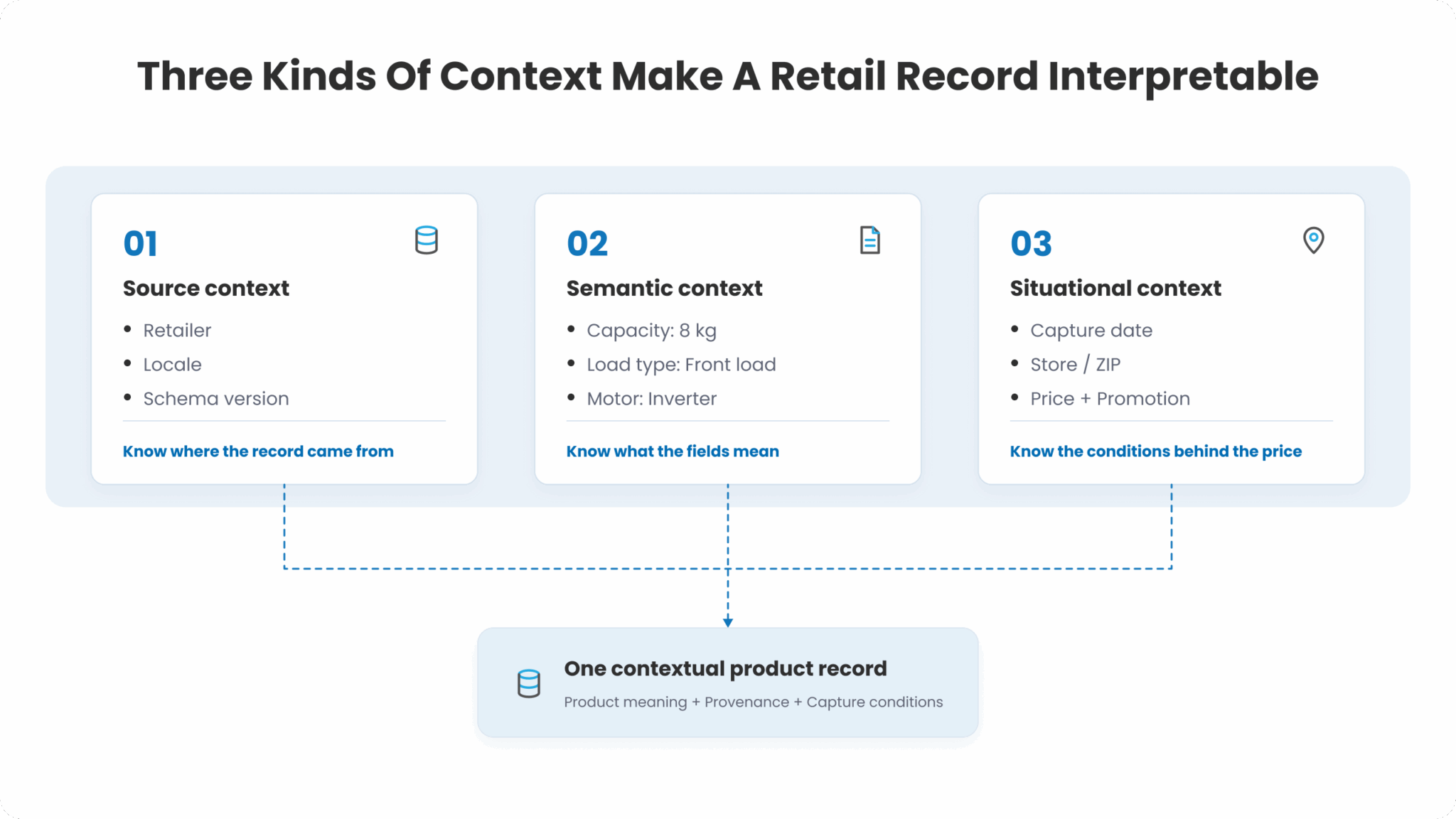
Contextual data, in our schema-level sense, has three components:
- Source context: which retailer, which locale, which schema version this record came from, since the same field name can carry different meanings across sources.
- Semantic context: what a raw string or attribute means once translated out of that retailer’s vocabulary and into a shared representation (a normalized taxonomy, a canonical attribute set).
- Situational context: the conditions under which the data was captured: date, ZIP code or store, price at time of crawl, promotional state. Strip this away and a price point becomes meaningless; a $42 price recorded during a flash sale is not comparable to a $42 shelf price recorded on an ordinary Tuesday.
A pricing engine, an assortment model, or a content-quality score that ignores any of these three loses accuracy in ways that are hard to detect until the numbers are already wrong.
Why Generic Data Cleaning Doesn’t Solve This
The instinct, especially from a general data engineering team, is to treat this as a data-cleaning problem: standardize casing, trim whitespace, deduplicate, done. That gets you partway and then stops working, for a reason that’s uncomfortable to admit if you’ve just spent a quarter building a generic ETL pipeline for it: normalization at the retailer-schema level is a domain problem, not a formatting problem.
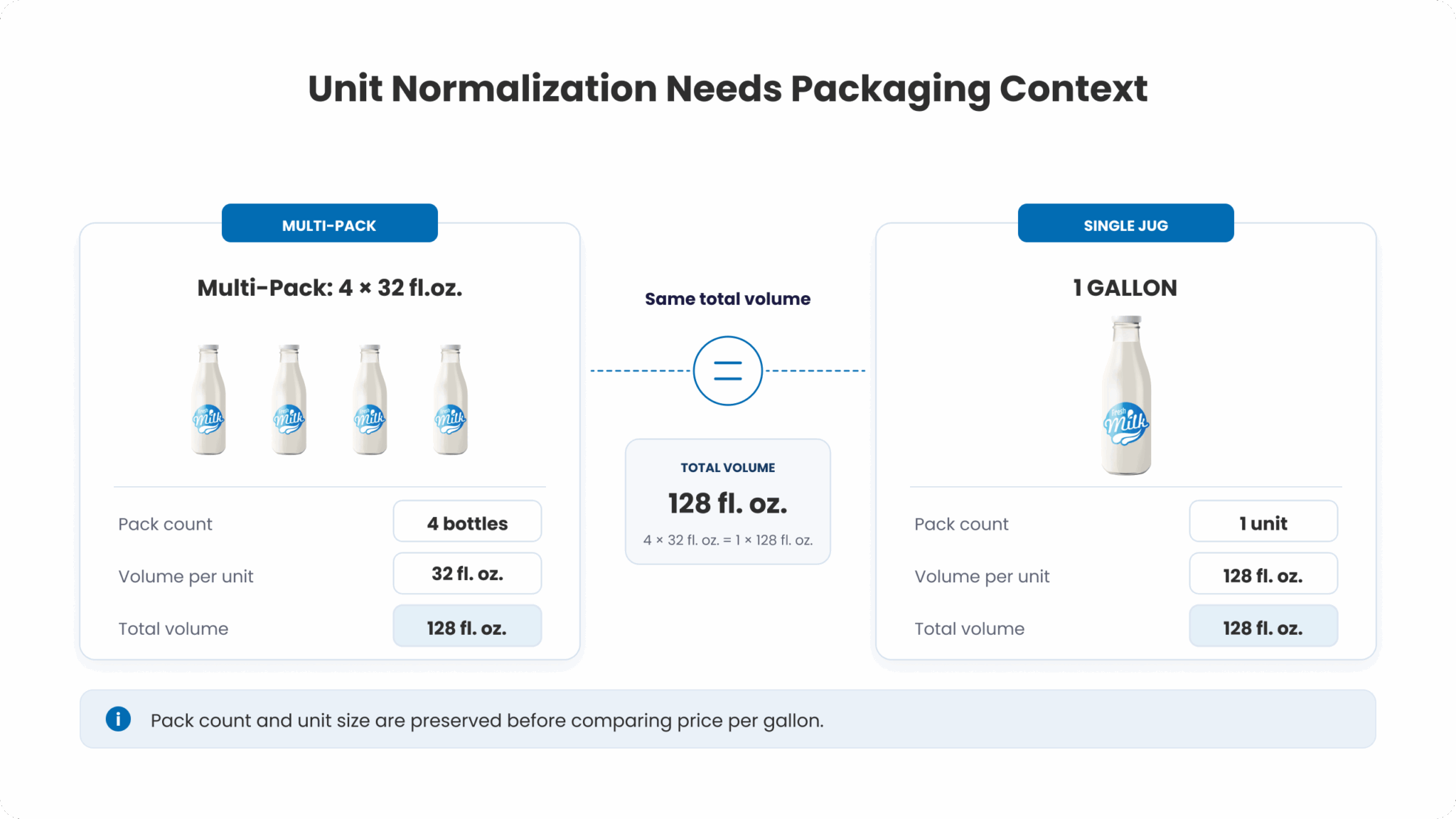
Consider unit-of-measure normalization, which looks like the easiest case in the whole pipeline. “8kg” and “8.0 KG” are trivial to reconcile with a regex. But “Family Pack (4x500ml)” versus “2 Litre” versus “68 fl oz” is not a formatting difference: it’s a conversion that requires knowing the product category’s packaging conventions, handling multipacks correctly (is the unit price per pack or per item?), and reconciling imperial and metric conventions that vary by country and even by retailer within a country. Get this wrong and every downstream price-per-unit comparison is silently corrupted.
Attribute normalization runs into the same wall one level up. A knowledge graph has to encode, category by category, which attributes exist, which values are valid, and which strings map to which canonical value. In DataWeave’s taxonomy this means a category hierarchy running to roughly 30 top-level categories, 500 subcategories, and 7,000 product types, each with its own set of expected attribute-value pairs (typically 10 to 15 per product type).
“Neckline,” “sleeve style,” and “fit” matter for apparel; “closure type” and “heel height” matter for footwear; neither matters at all for a washing machine, where “capacity,” “spin speed,” and “load type” are the attributes that carry pricing and assortment signal. A generic cleaning pipeline has no way to know this without the domain taxonomy underneath it, which is precisely why this can’t be outsourced to string-matching alone.
How normalization actually happens: text, image, and a knowledge graph in the loop
In practice, attribute extraction pulls from both text and image, because retailers are inconsistent about which one carries the ground truth. A title might say “Blazingly fast laptop, 16GB RAM”: extracting attribute: RAM, value: 16GB, product_type: Laptop requires parsing free text against a knowledge base of valid attribute-value pairs for that product type, not a fixed schema of column names. A product image might carry information the text never mentions at all: sleeve length, collar type, pattern, color dominance, sole material, attributes that only computer vision, not text parsing, can reliably extract at scale.
That’s the shape of the pipeline:
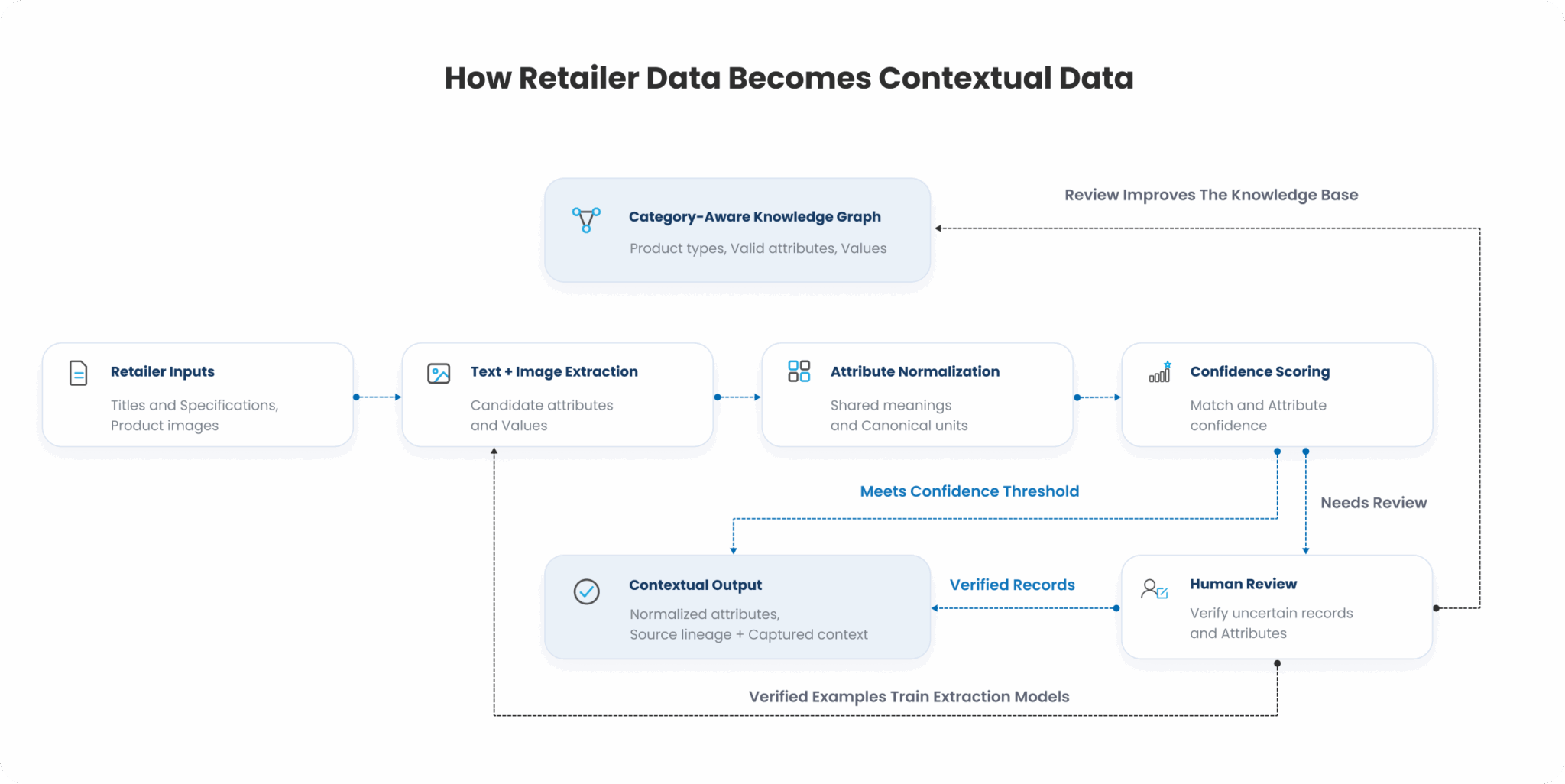
A few things about this pipeline are worth calling out explicitly, because they’re the parts a generic data team tends to skip.
- The knowledge graph sits at the center, not at the edge. It isn’t a lookup table bolted on after extraction: it’s what the extraction models are extracting into. Attribute tagging without a category-aware knowledge graph produces attributes with no guarantee they’re the right attributes for that product type, which is a subtler and more damaging failure than a missing value, because it looks correct until someone runs a query that depends on it.
- Confidence scoring is not optional. Every matched record and every tagged attribute carries a confidence score, and that score determines whether the record ships straight through or gets routed to human review. This matters because normalization accuracy is not uniform across categories: accuracy above 90% in categories like electronics and fashion is achievable, while apparel-adjacent categories with heavy variant complexity (color, size, pattern combinations) sit meaningfully lower without human-in-the-loop support.
- Human-in-the-loop is a training mechanism, not a patch. Every record a human verifies becomes a new training example, which is what allows match and tagging accuracy to keep improving: attribute tagging accuracy improving from roughly 75% and climbing for top categories is a direct consequence of this loop running continuously, not a one-time model tuning exercise.
What this looks like at the schema level, concretely
Take the earlier washing machine example through the pipeline. Three retailer titles, three schemas, three vocabularies come in. Text normalization strips casing and formatting inconsistency. Feature extraction pulls “8kg,” “front load,” “inverter,” and “white” as candidate attribute-value pairs from each title. The knowledge graph, which knows that “Washing Machine” as a product type expects capacity, load type, motor technology, and color as its core attributes, maps “8kg” / “8.0kg” / “8 KG” to a single canonical capacity value, “front load” and “FL” and “Front Load Washer” to a single canonical load-type value, and so on. The output is one contextual record with source lineage preserved (which retailer said what), not three disconnected listings.
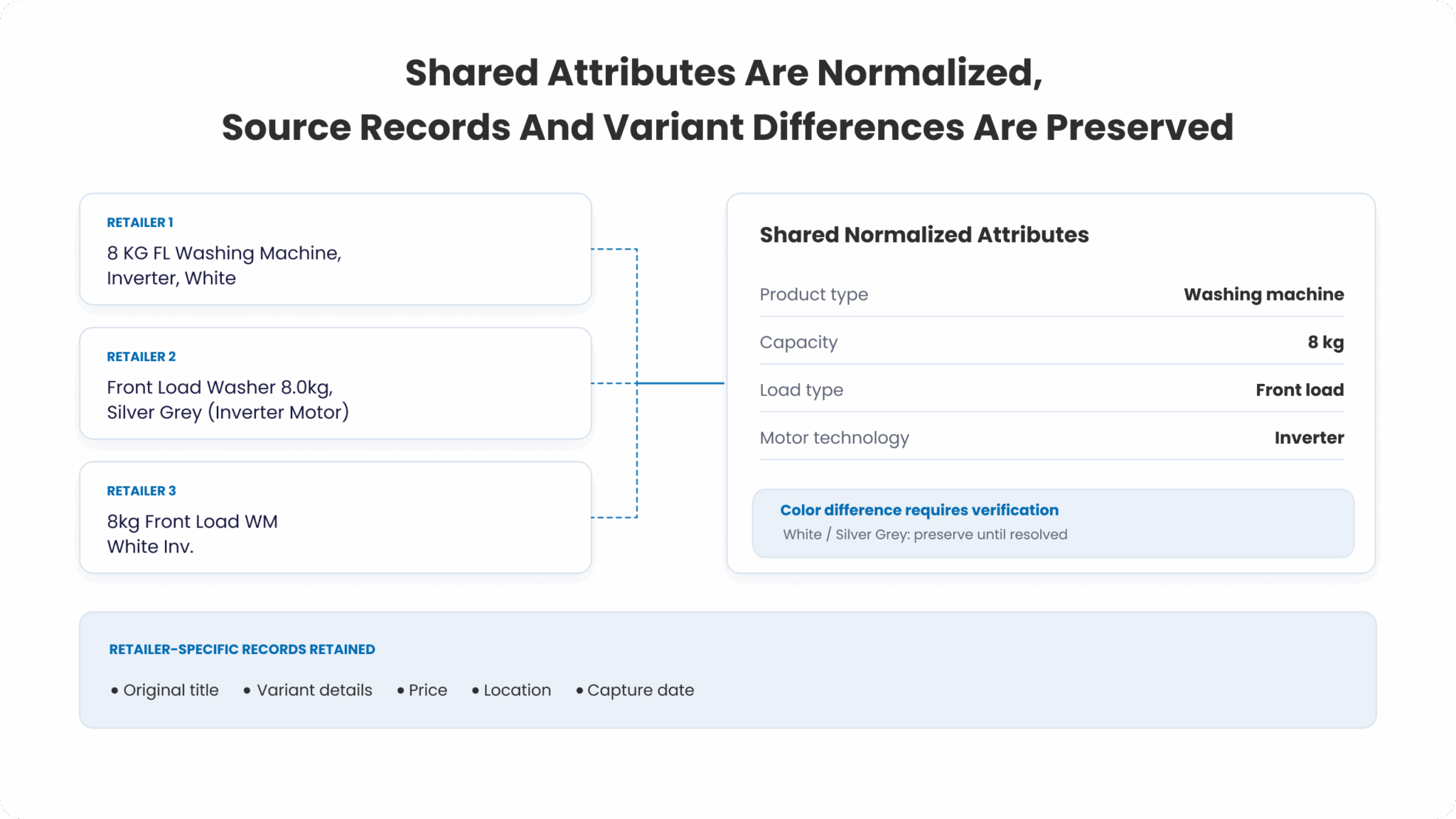
That contextual record is what makes every downstream use case in this series possible. A pricing engine comparing this washing machine’s price across three retailers needs to know it’s comparing the same product, at the same capacity and configuration: not silently averaging across three different SKUs because the titles didn’t match. An assortment analysis asking “which retailers carry an 8kg inverter front-load washer, and which don’t” needs the same canonical attribute set to answer the question at all. A content-quality score asking “does this listing’s title and spec sheet fully describe the product” needs to know what a complete attribute set for this product type is, in order to detect what’s missing.
Why this matters to brands and retailers, not just to engineering teams
It’s fair for a category manager or brand director reading this to ask: why should I care about a knowledge graph and a confidence-scoring pipeline? The answer is that every commercial decision built on top of retailer data (a price match, a promotion budget, an assortment gap analysis) inherits whatever errors sit in the normalization layer underneath it, silently and invisibly. A pricing algorithm fed unnormalized data doesn’t fail loudly; it just recommends the wrong price with complete confidence, because from its point of view, three differently-described products really did look like three different prices.
This is also why “we already have a data feed from our retailers” is not the same claim as “we have contextual data.” A feed gives you fields. Contextual data gives you fields you can trust mean the same thing wherever they came from: which is the actual prerequisite for any pricing, promotion, availability, assortment, or content-quality model that spans more than one retailer.
Part 3 of this series moves one layer up the stack: how promotion types get coded consistently across retailers that don’t just use different words for the same discount, but structure entirely different mechanics (buy one get one, tiered discounts, loyalty linked pricing) under labels that look deceptively similar on the surface.
If your team is trying to build pricing or assortment intelligence on top of retailer data that doesn’t yet agree with itself, this is the layer worth getting right first: reach out to us and we can walk through what that looks like for your catalog.




Login
For accounts configured with Google ID, use Google login on top.
For accounts using SSO Services, use the button marked "Single Sign-on".